Presentation Aids
Most bad slides are not ugly. They are unnecessary. Somebody opened PowerPoint before deciding what the speech was about, and forty minutes later there were fourteen slides and no argument. An aid is not a companion to your talk and it is certainly not a script — it is a tool you reach for at one specific moment because a sentence cannot do that particular job. A number that only lands when it is next to another number. A wound that has to be seen. A sequence with five steps the ear will not hold. Everything else belongs in your mouth. This chapter treats aids as a craft with rules you can check: what an aid must earn, which type carries which claim, how to build a slide that a person in the back row reads in three seconds, how to handle the object in your hands without losing the room, and what to do when the projector dies four minutes before you speak.
By the end of this chapter you can
- State the four legitimate functions of a presentation aid and apply the earn-its-place test to cut aids that fail it.
- Match a claim to the right aid type — object, model, image, chart, graph, video or handout — and justify the choice.
- Choose the correct graph form for a comparison, a trend, a composition or a distribution, and name the honesty problems in a misleading one.
- Redesign a text-heavy slide using the assertion–evidence pattern, the six-by-six myth, contrast, type size and the signal-to-noise ratio.
- Apply Mayer’s multimedia principles — especially redundancy, coherence, signaling and contiguity — to explain why bullet-reading fails.
- Integrate aids into delivery using reveal and conceal, the touch–turn–talk sequence and verbal transitions in and out of each aid.
- Build an accessible aid: contrast ratios, alt text, spoken description, captions and readable type.
- Use images and data ethically under fair use and Creative Commons licenses, and write a correct on-slide attribution.
- Write a contingency plan that lets you give the same speech with no technology at all.
Section 1What an Aid Is For — and When to Cut It
Four jobs an aid can legitimately do
A presentation aid is anything outside your voice and body that carries part of the message: a slide, a photograph, a stethoscope, a whiteboard sketch, a ten-second video clip, a sheet of paper you hand out at the end. Aids are not decoration and they are not proof of effort. Each one should be doing one of four jobs, and if you cannot name which, the aid is not ready.
The first job is clarifying: making a spatial, structural or sequential relationship visible when words would take too long. Describing the four chambers of the heart out loud takes ninety seconds and half your audience gets it backwards; one diagram takes four. The second is evidencing: putting the actual data in front of people so they can check your claim rather than take your word for it. The third is retaining: giving the memory a second channel, because a picture paired with a spoken explanation is remembered better than either alone. The fourth is persuading or moving — the photograph that makes an abstraction land in the body.
Notice what is not on the list. “Because everyone uses slides.” “Because I need something to look at so I do not forget.” “Because the assignment says visual aid.” The last one is real and you still have to satisfy it — but satisfy it with an aid that would have earned its place anyway.
The earn-its-place test
Here is the discipline. Before an aid survives, it has to pass three questions in order. One: what claim does this support? If the answer is “it is my topic,” it is a title, not an aid. Two: could a well-built sentence do this job faster? If yes, say the sentence. Three: while the audience is looking at this, what am I saying — and can they do both at once? If they must read to understand it, they are not listening, and you have just muted yourself.
That third question is the one students skip, and it is the one that does the most damage. Attention is not additive. Cognitive-load research going back to John Sweller in the 1980s, and refined for multimedia by Richard Mayer, treats working memory as a narrow channel that can be swamped. When words appear on screen and the same words come out of your mouth, listeners try to reconcile the two streams and lose both — the finding Mayer calls the redundancy principle. The instinct to put your script on the wall is exactly backwards.
| The aid | Verdict | Why |
|---|---|---|
| Slide reading “Introduction — Sarah Chen — COM 101 — Section 4” | Cut | Supports no claim; the audience already knows who is speaking because you are standing there |
| Photo of a flooded culvert under Route 9 | Keep | Evidences the claim, and one look does what forty words of description could not |
| Bulleted list of your three main points, shown at the start | Usually cut | A spoken preview does this better; the list on screen invites reading ahead and kills your sequence |
| Bar chart comparing fall rates on two units | Keep | A comparison of two quantities is exactly what the eye does well and the ear does badly |
| Clip-art stethoscope in the corner of every slide | Cut | Decorative load with no informational return — Mayer’s coherence principle says extraneous material hurts learning |
| The actual N95 respirator you are teaching people to seal-check | Keep | An object beats any image of it when the point is a physical action |
| Slide of the definition you are about to read aloud | Cut | Redundant with your speech; show the term alone if you must anchor the spelling |
Aids do not rescue a weak speech
There is a persistent classroom belief that visuals compensate for thin content. They do the opposite. A slide deck exposes structure: if your points do not divide cleanly, the deck will show it, and an audience that can see three slides labeled “Other Considerations” knows you ran out of argument. Build the speech first — thesis, main points, evidence — and only then ask where a picture is genuinely faster than a sentence.
Evidence on whether slides help at all is genuinely mixed, and it is worth being honest about that. Reviews of classroom research generally find that PowerPoint use per se produces little or no learning gain over a well-organized talk without it, while specific, well-designed graphics that support a specific explanation do help. In other words the medium is not the variable; the design and the fit are. You are not obligated to fill a deck. You are obligated to make each aid do work.
An aid earns its place only when it supports a specific claim faster than a sentence could and lets the audience look and listen at the same time; everything else is load.
Section 2Choosing the Right Aid for the Claim
Objects, models and live demonstration
The strongest aid is often the real thing. An object — the insulin pen, the fabric sample, the recalled part — carries authority no photograph has, because the audience knows it was in the room. Use one when the claim is about size, texture, weight, mechanism or how something is handled. The constraints are practical: it must be visible from the back row, safe, legal and yours to bring. A speech about opioid diversion does not get to include a controlled substance. A speech about knife skills does not get to include the knife on most campuses. Check policy before you plan around it.
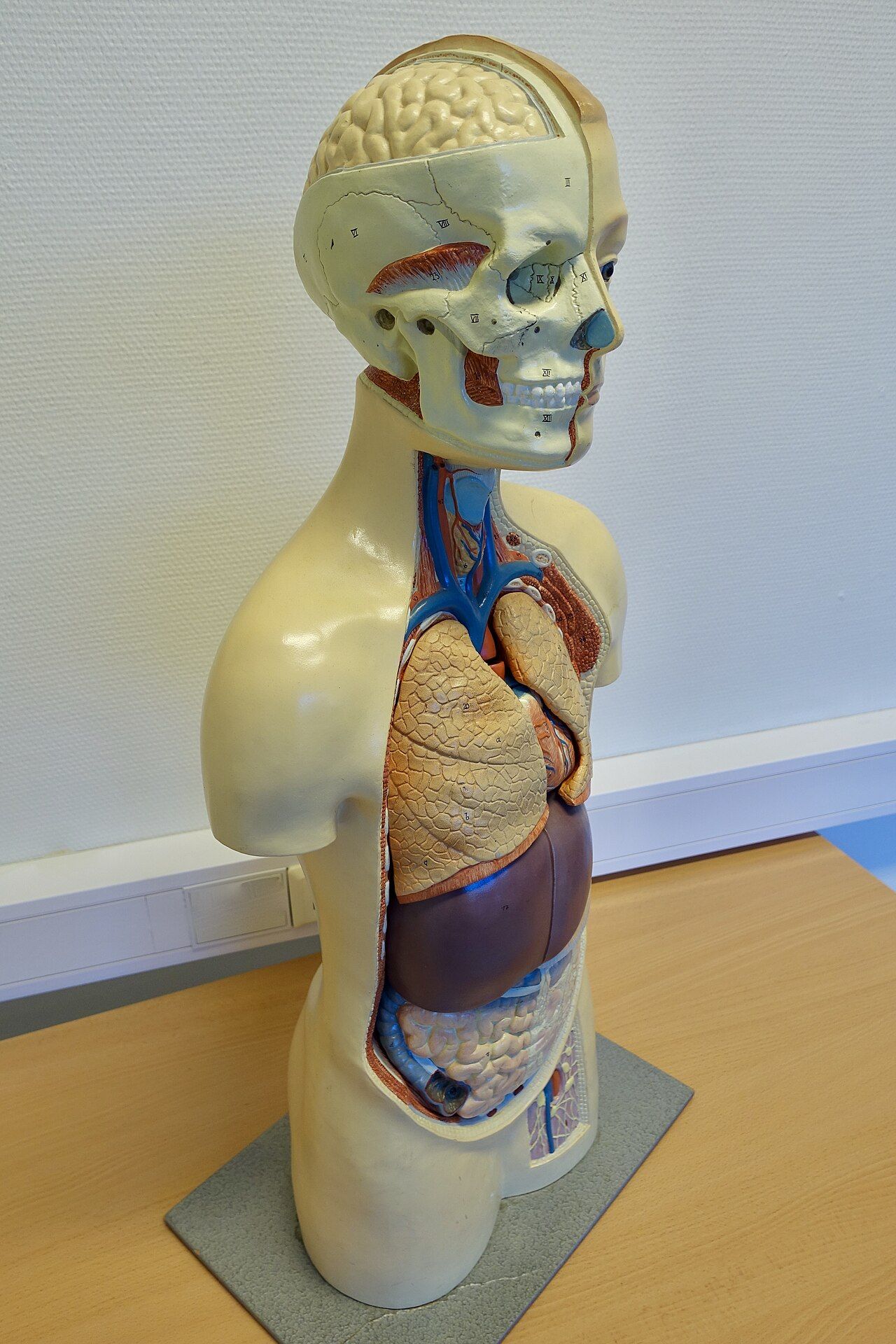
When the real object is too big, too small, too dangerous or too alive, use a model — a scaled or simplified physical stand-in. Models are strongest for internal structure and for anything with parts that come apart. Their honest limitation is that they misrepresent scale and texture, so say so: “this joint model is about twice life size, and the cartilage here is much thinner and much slicker than the plastic suggests.”
A demonstration shows a process rather than a thing. It is the most engaging aid and the most likely to go wrong, because it introduces real time into a rehearsed speech. Three rules keep it survivable. Pre-stage everything within arm’s reach in the order you need it. Narrate while your hands work — silence during a demonstration feels twice as long as it is. And carry the finished version, cooking-show style, so a failure at step four does not cost you the point.
Images, and what a picture actually proves
Photographs and drawings do different jobs and the difference matters. A photograph asserts “this happened, this exists, this is what it looks like.” A diagram or line drawing asserts “here is how the parts relate,” and it does that better than a photograph precisely because it has deleted everything irrelevant. A photo of an open surgical field is a mess of red; a labeled drawing of the same anatomy teaches. Choose the photograph for reality and emotional weight; choose the diagram for structure.
Maps are a third category, and their whole value is spatial: use one when the claim is about where, how far or what is next to what. If the claim would survive with a place name spoken aloud, you do not need the map.
Two cautions on images. First, resolution: a picture that looks crisp on a laptop can project as a blur, so preview at full size and reject anything soft. Second, graphic content. Wound photos, crash images and autopsy specimens are legitimate evidence in health-professions speaking and they are also a hazard — some listeners have a vasovagal response, some have a personal history you cannot see. Warn the room in plain words before it appears, keep it up only as long as the point requires, and never use shock where explanation would do.
| If your claim is about… | Use | Not | Because |
|---|---|---|---|
| How two quantities compare right now | Bar chart | Pie chart | The eye compares lengths accurately and angles poorly |
| Change over time | Line graph | Bar chart | A line makes direction and rate visible in one stroke |
| Parts of one whole, few categories | Pie or stacked bar | Line graph | Composition is the one job a pie does honestly, and only with 2–5 slices |
| A physical procedure | Live demonstration or short video | Bulleted steps | Motion and hand position do not survive translation into text |
| Internal structure of a body or device | Labeled diagram or cutaway model | Photograph | The diagram deletes the visual noise the photo cannot |
| The human cost of a statistic | One photograph of one person, with consent | A grid of stock images | Specificity moves people; volume numbs them |
| A decision pathway with branches | Flowchart | Paragraph or list | Branching is spatial; prose forces the listener to hold every fork in memory |
| The spread of many individual values | Histogram or dot plot | A single average | An average hides the shape; when the distribution is the point, show the distribution |
| Exact values someone must copy down | Handout distributed after | Slide | Nobody transcribes accurately from a screen at eight seconds a slide |
Charts, graphs and honest numbers
A chart organizes information — a flowchart, an organizational chart, a table. A graph plots quantities. Both fail the same way: too much at once. A graph built for a journal article has axis labels at eight points, six series and a legend; projected, it is wallpaper. Rebuild it. One claim per graph, the claim written as the title, the series you are actually discussing emphasized and the rest greyed or deleted. Label the lines or bars directly rather than sending the eye to a legend in the corner — that is Mayer’s contiguity principle, which holds that related words and images should sit together in space and time instead of at opposite ends of the slide.
Compare two versions of the same slide title. Weak: “Fall Rates, 2019–2024.” That is a label; it tells the audience what the axes already say. Strong: “Falls dropped by half after hourly rounding began.” That is an assertion title — a full sentence stating the takeaway — and the graph underneath becomes the evidence for it. This is the core of the assertion–evidence pattern developed by Michael Alley: a sentence headline, one supporting visual, few or no bullets. Studies of the format report better comprehension and retention than traditional bulleted slides, though the research base is modest and mostly from engineering and science classrooms.
Honesty in graphs is a technical skill, not just an intention. The most common distortion is a truncated vertical axis: starting the y-axis at 94 instead of 0 turns a two-point difference into a cliff. There is a real disagreement here — many statisticians argue that line graphs of trends legitimately zoom in on the relevant range, while bar charts must start at zero because the bar’s length is the encoding. The safe practice for a speaker is to start bars at zero, and whenever you truncate a line axis, say out loud what the range is. Other traps: unequal time intervals on the x-axis, 3-D effects that inflate the front slice of a pie, and dual y-axes chosen to make two unrelated lines appear to move together.
Pick the aid from the claim, not the other way around: objects for physical reality, diagrams for structure, photographs for evidence and weight, and the graph form that matches whether you are comparing, tracking, dividing or branching.
Section 3Designing a Slide Somebody Can Actually Read
The three-second rule and the signal-to-noise ratio
A slide has about three seconds. That is roughly how long an audience will look before deciding whether to read it or return to you, and if reading wins, you have lost the room to a document. So design for a glance, not for study. One idea per slide. The idea stated in words at the top. The evidence for it below. Nothing else.
Signal-to-noise ratio is the useful frame, borrowed from engineering and made a design principle by Garr Reynolds in Presentation Zen and by the authors of Universal Principles of Design. Signal is anything carrying meaning; noise is everything else — the gradient background, the logo repeated forty times, the drop shadows, the clip art, the border, the transition that spins. Every unit of noise you delete makes the signal easier to find. When you cannot decide whether an element is signal, delete it and see whether the slide still makes its point. It almost always does.
This is not minimalism as taste. It is Mayer’s coherence principle: adding interesting but extraneous material to a multimedia explanation reliably reduces learning, even when the extras are attractive and even when learners say they liked them. Preference and performance come apart here, which is why “my friends thought it looked cool” is not evidence that a slide works.
Text: the six-by-six myth and what to do instead
You have probably been taught the six-by-six rule: no more than six bullets per slide, six words per bullet. Treat it as a ceiling, never a target. It was invented to stop people from pasting paragraphs, and it succeeded at that while accidentally teaching a generation that a good slide is a list. A slide with six six-word bullets is still thirty-six words the audience must read while you talk, and it still triggers the redundancy problem. The better instruction is blunter: if the audience is reading, you are not being heard.
Replace lists with assertion–evidence. Watch what happens to one slide from a nursing in-service.
| Element | Before | After |
|---|---|---|
| Title | “Hand Hygiene” | “The moment we miss most is before we touch the patient” |
| Body | Six bullets: “Hand hygiene is important” · “WHO five moments” · “Compliance is often low” · “Barriers include time” · “Education helps” · “Audits are ongoing” | One bar chart: compliance by moment, the “before patient contact” bar in the accent color, the other four in grey |
| Words on screen | 21, spread across six competing lines | 17 — 11 of them one headline, 6 in the axis labels |
| What the speaker says | Reads the bullets, adding a little | Tells the story of one shift, names the number, explains the barrier, asks for one change |
| What the audience does | Reads ahead, finishes early, disengages | Reads the headline in two seconds, then watches and listens |
When you genuinely need text on screen — a quotation you want people to sit with, a definition, a phone number, a name with unusual spelling — put it up and then stop talking for a beat. Let them read it. Two seconds of silence is not dead air; it is the only way both channels get used. Then speak.
Type, color and contrast
Size first, because it is the failure that ends discussion. Anything under 24 points is unreadable from the back of an ordinary classroom, and the practical floor for body text is closer to 28 or 30, with titles at 36 to 44. If your content will not fit at that size, the content is too much for one slide — that is the purpose of the constraint, not a flaw in it. Sans-serif faces such as Arial, Calibri, Helvetica and Verdana hold up better under projection than fine-stroked serifs. The familiar claim that serif type is easier to read in general is about print, and the research behind it is far weaker than the folklore suggests.
Contrast is the second lever. Dark text on a light background works in a lit room; light text on a dark background works in a dark room and is easier on the eyes in a webinar. What never works is mid-tone on mid-tone, or the classic disaster of saturated red text on a blue field, which appears to vibrate. A practical check: photograph the slide with your phone and view it in greyscale. If the text disappears, so does your audience’s comfort.
Color carries meaning, so use it sparingly and consistently: one accent color that always means “this is the point,” and neutral grey for everything else. That is Mayer’s signaling principle in practice: a cue that marks the essential material improves learning, which only works while the cue stays rare. Never let color be the only carrier of information. Roughly one in twelve men and about one in two hundred women has some form of color vision deficiency, and red-green is the common form — which is exactly the pair people reach for to mean bad and good. Add a label, a pattern, a direct annotation or a different shape so the message survives without color.
| Design decision | Weak version | Better version | Reason |
|---|---|---|---|
| Slide title | “Results” | “The new triage script cut wait times by nineteen minutes” | An assertion title tells the audience what to look for in the data |
| Body text size | 18 pt so everything fits | 30 pt, and split across two slides | If it does not fit at 30 pt, it is too much for one glance |
| Emphasis | Bold, italic, underline and red at once | One accent color on one element | Emphasis that is everywhere is emphasis nowhere |
| Chart legend | Key in the corner with five colors | Labels placed directly on the lines | Contiguity: the eye should not travel across the slide to decode |
| Data table | Twelve rows by six columns at 12 pt | The three rows the point depends on; full table in the handout | Tables are for readers, not for viewers |
| Background | Photograph behind the text | Solid field, or a full-bleed photo with no text on it | Text over texture loses contrast unpredictably under projection |
| Animation | Every bullet flies in with a sound effect | One build that reveals a second data series | Motion should carry meaning, not entertain |
| Color coding | Red bar bad, green bar good, no labels | Labeled bars plus different fill patterns | Color-blind viewers and greyscale handouts both survive |
Design each slide for a three-second glance — one assertion in a sentence headline, one piece of evidence, large type, high contrast, a single accent color and nothing decorative.
Section 4Handling Aids Without Losing the Room
Reveal, use, conceal
An aid that is visible when it is not being used is competing with you. That is the whole logic of reveal and conceal: bring the aid into view at the moment you need it, use it, then take it away. With physical objects this is literal — keep the item covered or behind you until its moment, and set it down and out of sight when you are done, because a passed-around object guarantees that a third of the room is looking at their hands instead of at you. Never circulate anything mid-speech. Show it, describe it, and offer it afterward.
With slides the concealment tool is the black screen. Pressing B blanks the display to black in PowerPoint, Keynote and Google Slides alike, and W gives white in all three. Use it every time you move to a stretch of talk that has no visual. The effect on a room is immediate: eyes come back to you. Building a deck with a deliberate blank slide between visual moments accomplishes the same thing and cannot be forgotten under pressure.
The corollary is that your first slide should not be up while you deliver your introduction. Your attention-getter, your credibility statement and your thesis are the most human sixty seconds of the speech. Give them a blank screen and a face.
Touch, turn, talk
The single most common delivery failure with aids is talking to the screen. Your voice projects where your face points, so a speaker addressing a slide is quieter, harder to lip-read and visibly disconnected. The fix is a three-beat sequence: touch, turn, talk. Touch means direct attention to the aid — a gesture toward it, a laser point held briefly, a hand on the model. Turn means bring your body and eyes back to the audience. Talk means say the sentence. Never reverse the order, and never do the third beat while facing away.
Point with the arm nearest the screen and keep your shoulders open to the room; crossing your body to point closes you off and looks awkward. If you use a laser pointer, hold it against the screen for two full seconds on one spot, then switch it off. Nervous hands produce a wandering red dot that broadcasts your tremor to a hundred people, which is exactly what you did not want.
Verbal transitions matter as much as physical ones. An aid needs a sentence to bring the audience in and a sentence to take them out, or it appears and vanishes without meaning. Weak: silence, then a new slide. Better: “Look at what happens to the third bar — that is the night shift.” Pause. Explain. Then: “So the gap is not staffing overall. It is one shift. Which brings me to why.” The aid has been framed, read and closed.
| Moment | What weak handling looks like | What to do instead |
|---|---|---|
| Aid appears | New slide with no comment; speaker keeps talking about the last point | “Here is the same unit, one year later.” Then two seconds of silence while they look. |
| Explaining a graph | Facing the screen, tracing the line with the pointer, voice dropping | Touch the axis, turn to the room, then say what the line means and the number out loud |
| Demonstrating a device | Head down, working in silence for twenty seconds | Narrate every step; hold each finished stage up at chest height and pause |
| Handing out paper | Passing sheets around during the speech | Distribute at the door before, or at the very end — and say when you will |
| Moving on | Slide stays up for the next three minutes | Press B, or advance to a deliberate blank, and step back to center |
| Video clip | Two-minute clip plays; speaker stands aside doing nothing | Clip of 20–40 seconds, cued to the exact second, with a setup line before and a takeaway line after |
| Something breaks | Apologizing, clicking repeatedly, narrating the malfunction | One calm sentence, then deliver the content without it: “The chart is not cooperating — here is the number that mattered.” |
Rehearse with the aid, not around it
Aids fail at the seams — the moment of advancing, the moment of picking something up, the moment of finding the clip. Those seams only exist in real time, which means silent rehearsal in your head does not test them. Practice at least three full run-throughs with the actual remote, the actual object, the actual file on the actual laptop, standing up, out loud.
Two habits pay for themselves. First, rehearse the transitions by themselves — just the sentence before each aid and the sentence after — five times through. Those are the lines that vanish under adrenaline. Second, know your deck by number. If you can say “slide nine” and picture it, you can recover from any accidental double-click by typing the number and pressing Enter, which jumps straight there in every major program.
Finally, rehearse once without the aids at all. Not as a stunt — as insurance. If the speech collapses when the screen is dark, the aids were not supporting the speech; they were the speech, and you are one dead HDMI cable away from having nothing to say.
Show an aid only while you are using it, keep your face to the audience with touch–turn–talk, frame every aid with a sentence in and a sentence out, and rehearse the seams where aids actually fail.
Section 5Accessibility, Ethics and the Plan for When It Breaks
Design so nobody is left out
Accessibility is not an accommodation you add when someone requests it. It is a design property of the aid, and most of it costs nothing if you build it in from the start. Assume every room contains someone who cannot see the screen well, someone who cannot hear a soundtrack clearly, and someone processing your material in a second language.
The habits that matter most are small. Say aloud what is on the screen — not by reading bullets, but by describing the visual: “This is a line graph, five years across the bottom, infection rate up the side. The line falls sharply after 2022.” That sentence costs you six seconds and serves the person with low vision, the person on a bad video connection and the person taking notes. Add alt text to every meaningful image in the file itself, so screen readers reach it when you share the deck. Caption any video — automatic captions on YouTube and Zoom are imperfect but far better than nothing, and you should check them for your key terms, because speech recognition mangles clinical vocabulary. Keep contrast high; the widely used WCAG guidelines call for a contrast ratio of at least 4.5 to 1 for normal text and 3 to 1 for large text, and free online contrast checkers will tell you in seconds.
Handouts deserve the same care. Twelve-point type minimum, real headings rather than bolded lines, and a plain-text or tagged PDF version if you are distributing electronically. If you use a QR code, also say and show the plain URL, because not everyone in the room has a phone that scans.
| Barrier | What it looks like | The fix, which takes under a minute |
|---|---|---|
| Visual-only information | “As you can see here…” followed by silence | Describe the visual in one sentence and say every number aloud |
| Uncaptioned audio or video | A clip with narration and no text | Turn on captions; check them for jargon; summarize the clip afterward |
| Color-only coding | Red and green bars, no labels | Direct labels plus a pattern or shape difference |
| Low contrast | Grey text on a pale blue background | Near-black on near-white, or the reverse; verify 4.5 to 1 |
| Images with no alt text | A shared deck a screen reader announces as “image” | Write one descriptive sentence in the alt-text field of each image |
| Motion and flashing | Fast animation, strobing transition | Remove it; rapid flashing can trigger seizures and nothing is gained |
| Dense handout | Ten-point type, no headings | Twelve point, real heading styles, generous white space |
Where the picture came from — and whether you may use it
Two obligations run in parallel here and students often collapse them. Attribution is an academic and ethical duty: say whose work this is. Copyright is a legal one: establish that you are permitted to use it. Satisfying one does not satisfy the other. Crediting a photographer does not make an unlicensed use legal, and a paid license does not excuse you from citing a source in an academic speech.
For classroom speaking in the United States, most reasonable use of a modest number of images falls within fair use, the four-factor doctrine in Section 107 of the Copyright Act that weighs purpose, nature of the work, amount used and market effect. Educational and transformative use in a closed classroom leans favorable; the same deck posted publicly or used in a paid workshop is a different analysis. Fair use is a defense assessed case by case, not a checkbox, so the safest habit is to build from openly licensed material.
That is where Creative Commons earns its keep. Wikimedia Commons and Openverse aggregate Creative Commons work; Unsplash and Pexels are free but run their own house licenses rather than CC ones; and images produced by federal agencies such as NIH and CDC are generally public domain as United States government works. Read the specific license every time, because CC BY, CC BY-SA, CC BY-NC and CC0 impose different conditions, and a non-commercial clause matters the moment your talk is anything but free. Then write the credit in the standard order: title, author, source, license — often abbreviated TASL. Put it in small type at the bottom of the slide where it lives, not on a wall of credits at the end.
| Weak credit | Correct credit | What was missing |
|---|---|---|
| “Google Images” | “Chest radiograph by J. Heilman, MD, via Wikimedia Commons, CC BY-SA 4.0” | Google is a search engine, not a source; no author and no license |
| “Source: internet” | “Hand hygiene compliance data, CDC, 2023, public domain” | No identifiable origin, so the audience cannot verify anything |
| “Photo: Pexels” | “Photo by Anna Shvets on Pexels, Pexels License” | Photographer unnamed; license unstated |
| Chart with no note | “Data: National Center for Health Statistics, 2024. Chart by author.” | Made an original chart look like an original finding |
| Full quotation, no name | “‘The great enemy of communication, we find, is the illusion of it.’ — William H. Whyte, Fortune, 1950” | An uncredited quotation on a slide is plagiarism even if you say the name aloud — and this one is routinely mis-credited to George Bernard Shaw, which is what happens when nobody records the source |
Ethics also covers what you do to the content. Do not crop a photograph so it implies something the whole frame contradicts. Do not use a stock image of strangers in a way that suggests they are your patients, your data or your community. Do not run a graph through a filter that flatters your claim. And if you generate an image with an AI tool, label it as such — an AI-rendered “photograph” of a clinical finding is not evidence of anything, and presenting it as one is a fabrication regardless of intent.
The contingency plan
Technology fails on a schedule that correlates suspiciously with how much you are counting on it. Build a contingency plan so the failure is an inconvenience rather than an ending. The plan has four layers, and it takes about ten minutes to assemble.
Layer one: format. Export the deck to PDF as well as its native format, since PDF preserves fonts and layout on any machine and opens everywhere. Layer two: location. Keep the file in the cloud, on a flash drive and emailed to yourself. Layer three: independence. Embed video files in the deck rather than relying on streaming, and download anything you planned to show live, because conference wireless and hospital guest networks fail constantly. Layer four: the human backup. Know which two or three sentences replace each visual, and print one page with the key numbers on it that you can read from if the screen is dark.
Then arrive early enough to test. Connect to the actual projector, confirm the adapter fits, check that your fonts survived, play the first ten seconds of every clip with the sound up, and stand at the back of the room to look at your own slide. A working adapter in your bag — USB-C, HDMI, and whatever your laptop needs — has rescued more presentations than any design principle in this chapter.
If something fails anyway, the recovery is behavioral rather than technical. Name it once in a calm sentence, move on, and deliver the content without it. Audiences forgive equipment. What they remember badly is a speaker who spends ninety seconds fighting a cable while the room watches.
Build aids that work for everyone in the room, credit and license every borrowed image properly, and carry a plan that lets you give the whole speech with a dark screen.
The chapter in one breath
An aid is a tool with a job, and the job has to be nameable before the tool is allowed in. Four jobs qualify — clarifying a relationship, evidencing a claim, helping memory, moving an audience — and the earn-its-place test cuts the rest, because attention is a single narrow channel and anything the audience must read is time they are not spending on you. Once an aid survives, the type follows from the claim: an object for physical reality, a model for hidden structure, a diagram for how parts relate, a photograph for evidence and weight, a bar for comparison, a line for change, a histogram for spread, a flowchart for branching, a handout for anything anyone needs to copy. Design then serves a three-second glance: an assertion title that states the takeaway, one piece of evidence under it, type large enough for the back row, ruthless deletion of decoration, one accent color and never color alone. Delivery is where most of it is lost or kept — reveal, use, conceal; touch, turn, talk; a sentence in and a sentence out; rehearsal at the seams. And around all of it sits the professional layer: accessible by design, honestly sourced and licensed, and backed by a plan that still works when the screen goes dark.
Words worth knowing
| Term | What it means |
|---|---|
| Presentation aid | Anything outside the speaker’s voice and body that carries part of the message — slide, object, model, image, video, handout. |
| Earn-its-place test | Three questions an aid must pass: what claim does it support, could a sentence do it faster, and can the audience look and listen at once. |
| Object | The real item itself, used when size, texture, mechanism or handling is the point. |
| Model | A scaled or simplified physical stand-in for something too large, small, dangerous or hidden to show directly. |
| Demonstration | An aid that shows a process in real time; strongest for procedures, most vulnerable to going wrong. |
| Chart | A visual that organizes information — flowchart, organizational chart, table — rather than plotting quantities. |
| Graph | A visual that plots quantities; the form should match comparison, trend, composition or distribution. |
| Assertion–evidence | Michael Alley’s slide pattern: a full-sentence headline stating the takeaway, supported by one visual, with few or no bullets. |
| Assertion title | A slide headline written as a complete claim (“Falls dropped by half”) rather than a label (“Results”). |
| Truncated axis | A value axis that does not begin at zero, exaggerating small differences; disallowed for bars, debated but sometimes defensible for line trends. |
| Signal-to-noise ratio | The proportion of a slide carrying meaning versus decoration; raise it by deleting, not by adding. |
| Six-by-six rule | The convention of at most six bullets of six words; useful as a ceiling, harmful when treated as a design goal. |
| Redundancy principle | Mayer’s finding that identical on-screen text plus spoken narration reduces learning compared with narration and graphics alone. |
| Coherence principle | Mayer’s finding that adding interesting but extraneous words, images or sounds reduces learning. |
| Signaling principle | Mayer’s finding that cues highlighting the essential material — a headline, an arrow, an accent color — improve learning. |
| Contiguity | Placing related words and images close together in space and time, so the eye and ear do not have to travel to connect them. |
| Reveal and conceal | Bringing an aid into view only for the moment it is used, then removing it — with a cover, a black screen or a blank slide. |
| Touch, turn, talk | The delivery sequence for any aid: direct attention to it, return your body and eyes to the audience, then speak. |
| Alt text | A written description attached to an image in the file so screen readers can convey it to viewers who cannot see it. |
| WCAG | The Web Content Accessibility Guidelines, source of the common contrast targets of 4.5 to 1 for normal text and 3 to 1 for large text. |
| Fair use | The four-factor United States doctrine that can permit limited unlicensed use of copyrighted work; assessed case by case, not guaranteed. |
| Creative Commons | A family of public licenses (CC0, CC BY, CC BY-SA, CC BY-NC and others) whose specific terms govern how a work may be reused. |
| TASL | The standard attribution order for an open-licensed work: title, author, source, license. |
| Contingency plan | The layered backup — PDF export, multiple copies, embedded media, printed key numbers — that lets the speech proceed without technology. |