PRESENTING DATA AND VISUAL EVIDENCE
Numbers do not speak for themselves. A spreadsheet dumped into a report is not evidence; it is homework you have handed to your reader. Your job is to do the interpretive work first — decide what the data actually shows, decide whether a sentence, a table, or a chart carries it best, then build that display so cleanly that the point lands in about four seconds. This chapter is a workshop in that craft. You will write one-sentence findings from raw counts, rebuild an ugly table into a readable one, pick chart types by the shape of the question rather than by habit, and learn the specific ways a truthful data set can be made to tell a lie by an axis, a denominator, or a missing baseline. You will also learn to attach a visual to a document properly — numbered, captioned, called out, sourced, and readable by someone using a screen reader or seeing your colors differently than you do.
By the end of this chapter you can
- Draft a one-sentence finding before building any display, and choose deliberately among a sentence, a table, and a chart based on what the reader must do with the numbers.
- Build a table that follows tabular convention: cases in rows, variables in columns, numbers right-aligned on the decimal, consistent significant figures, and units stated once in the header.
- Match a chart type to the comparison at hand — trend, ranking, part-to-whole, distribution, or relationship.
- Apply the encoding hierarchy, favoring position and length over area, angle, and color saturation.
- Replace label-style titles with assertive titles and replace legends with direct labels.
- Detect and repair the standard distortions: truncated baseline, dual axis, missing denominator, and cherry-picked range.
- Distinguish percentage points from relative change, and state uncertainty honestly when counts are small.
- Integrate a visual into a document using figure numbering, a callout, a caption, a source line, and useful alt text.
- Deliver a thirty-second spoken talk track that walks a live audience through a chart without reading it aloud.
Section 1Start With the Sentence, Not the Chart
The one-sentence finding
Before you open a charting tool, write the sentence you want the reader to repeat to someone else tomorrow. If you cannot write that sentence, you do not yet have a finding — you have a data set. This is the single highest-leverage habit in the chapter, and it is the one most often skipped.
Here is a small, realistic set. A forty-four-bed medical-surgical unit recorded 14, 13, 8, and 7 patient falls in the four quarters of a year, against 3,421, 3,402, 3,290, and 3,355 patient days. An hourly rounding program started on the first day of the third quarter. Now compare three ways of introducing that data.
Weak: “Fall data for the year is presented in Table 1 below.” This sentence contains no finding. It tells the reader that a table exists, which they can see. Better: “Falls declined over the year.” True, but vague, and it ignores the denominator. Strong: “Falls per 1,000 patient days fell from 4.1 in the first quarter to 2.1 in the fourth, a drop of roughly half, coinciding with the July start of hourly rounding (Table 1).” That version names the measure, gives the endpoints, quantifies the change, notes the timing, and points to the evidence — and it does all of it in one breath.
The strong version still overclaims slightly, and a careful writer fixes that in the following sentence: “With only forty-two falls in the entire year, a swing of two or three events moves the quarterly rate noticeably, so we read this as an encouraging signal rather than a demonstrated effect.” Notice what just happened. The honest caveat did not weaken the report. It made the writer sound like someone who understands their own data, which is the most persuasive thing a professional can sound like.
Sentence, table, or chart?
Not every number deserves a picture. Three numbers in a paragraph are usually clearer as three numbers in a paragraph. A chart of two bars is a decoration, not an analysis. Meanwhile, a fifteen-row comparison across six columns is torture in prose and perfectly comfortable in a table. The choice follows from what the reader has to do.
Use a sentence when there are fewer than about four values and no pattern to trace. Use a table when the reader needs to look up a specific value, compare exact figures, or check your arithmetic — auditors, finance reviewers, and regulators live in tables. Use a chart when the message is a shape: a rise, a gap, a cluster, an outlier, a distribution with a long tail. Tables are for lookup and precision. Charts are for pattern and proportion.
| What the reader needs to do | Best display | Worked example |
|---|---|---|
| Absorb two or three values in passing | Plain sentence | “Overtime hours rose from 412 to 508 in one quarter, a 23 percent increase.” |
| Look up an exact number later | Table | Staffing cost by unit and month, for a budget appendix |
| Compare exact figures across many categories | Table, sorted by the column that matters | Twelve clinics, four quality measures each |
| See a change over time | Line chart | Monthly readmission rate over twenty-four months |
| Rank items against each other | Horizontal bar chart, sorted by value | Top ten reasons for supply reorder delays |
| See how the whole splits up | Stacked bar, or a table of percentages | Share of admissions by referral source |
| See spread, typical value, and outliers | Histogram or box plot | Door-to-triage time for 906 visits |
| See whether two things move together | Scatter plot | Staffing ratio against fall rate, one dot per unit |
Audience decides resolution
The same finding needs different resolution for different readers. Your unit manager wants the quarterly rate and the intervention date. The quality committee wants the rate, the confidence interval, the case mix, and the comparison to the system benchmark. The board wants one number and a direction arrow. None of them is wrong; they are making different decisions.
So build the detailed table first, then decide how much of it survives into the body of the document. Everything that does not survive goes to an appendix, and you say so: “Unit-level figures are in Appendix C.” That single clause buys you enormous credibility, because it signals that you did not hide the granular data — you simply declined to make the reader wade through it.
One caution about executive summaries. Compressing to a single number is legitimate; compressing away the caveat is not. If the honest version of your finding requires the phrase “based on forty-two events” or “before risk adjustment,” that phrase travels with the number into every version of the document, including the slide.
Write the one-sentence finding first; the display you build afterward is simply the fastest available proof of that sentence.
Section 2Tables People Can Actually Read
Structure: cases down, variables across
A readable table follows one structural rule: each row is a case (a quarter, a clinic, a patient group), and each column is a variable measured on those cases (count, rate, cost). Readers scan columns to compare, and they scan far more comfortably down a column than across a row. That means the number you most want compared should be a column, not a row.
Order the rows for the reader, not for the database. Time series go in chronological order. Everything else goes in rank order by the column that carries your point — largest first, unless there is a reason otherwise. Alphabetical order is the default of a system that does not know what matters; use it only when the reader genuinely will look items up by name.
Here is a table exactly as it usually arrives from a spreadsheet export. Read it and notice how much work it makes you do.
| Quarter | Falls | Days | Rate | Notes |
|---|---|---|---|---|
| Q3 | 8 falls | 3290 | 2.4316109 | rounding started |
| Q1 | 14 falls | 3421 | 4.0923707 | |
| Q4 | 7 falls | 3355 | 2.0864382 | |
| Q2 | 13 falls | 3402 | 3.8212816 | pilot approved by committee 6/12 |
Four problems, all typical. The rows are out of order. “Rate” has no unit, so the reader cannot tell whether it is per 1,000 patient days, per 100 admissions, or per bed. Seven decimal places imply a precision that eight events cannot possibly support. And the word “falls” is repeated in every cell of a column already headed “Falls.” Now the same data, rebuilt.
| Quarter (2025) | Falls (n) | Patient days | Falls per 1,000 patient days |
|---|---|---|---|
| Q1 (Jan–Mar) | 14 | 3,421 | 4.1 |
| Q2 (Apr–Jun) | 13 | 3,402 | 3.8 |
| Q3 (Jul–Sep) | 8 | 3,290 | 2.4 |
| Q4 (Oct–Dec) | 7 | 3,355 | 2.1 |
| Year | 42 | 13,468 | 3.1 |
| Hourly rounding began 1 July 2025 (start of Q3). Rates are unadjusted for patient acuity. | |||
The rebuilt table answers questions before they are asked. Units live in the header, so the cells hold nothing but numbers. Rounding is consistent at one decimal. The total row is present and visually distinct. The single explanatory note sits under the table where a footnote belongs, rather than scattered through a “Notes” column that broke the column-scanning rhythm.
Numbers: alignment, rounding, and the honest decimal
Right-align numeric columns so that the ones, tens, and hundreds stack vertically. Left-align text. This is not decoration — alignment is what lets the eye compare magnitudes without reading every digit. A column of right-aligned figures shows you the big numbers as a ragged left edge.
Round to the precision your data actually earns. A rate built from eight events does not support seven decimals; it barely supports one. A useful discipline: carry full precision through the calculation, then round once at the display, and keep the same number of decimals down the whole column. Percentages in a business or clinical report almost never need a decimal at all, unless the differences you are discussing are smaller than one percentage point.
Three smaller conventions save readers real effort. Use thousands separators (13,468 rather than 13468). Never leave a cell blank when the value is zero — write 0, and use an em dash or “n/a” when data is genuinely missing, because a blank cell is ambiguous between the two. And keep the same measure in the same column: do not mix counts and percentages in one column and expect the header to sort it out.
Labels, totals, and notes
Every table needs a number and a title above it (“Table 1. Falls and fall rate by quarter, Unit 4 East, 2025”) and a source line below it. Style guides differ on placement: Chicago and IEEE put table titles above and figure captions below, while APA puts both table and figure titles above with the note underneath. Follow whichever guide governs your document, and be consistent throughout it. Then say where the numbers came from: “Source: incident reporting system, extracted 14 January 2026.” The extraction date matters more than people expect, because live systems get amended retroactively and your numbers will not match a query run three months later.
Total rows should sum to the parts, and if they do not, explain why in the note — rounding, exclusions, or overlapping categories. A reader who adds your column and gets a different answer will silently discount everything else in the document. If you exclude cases, say how many and why: “Excludes six falls occurring during transport off-unit.”
Finally, strip the rules. Heavy grid lines around every cell fight the data. Most tables read better with a rule under the header, a rule above the total, and a rule at the base, with white space doing the rest of the work. If your table has more ink in its borders than in its numbers, the borders are winning an argument they should not be in.
A good table is an act of editing — ordered rows, units in the header, one rounding rule, a real total, and a note that answers the obvious question.
Section 3Choosing and Building the Right Chart

Match the chart to the comparison
Most bad charts are the result of picking a shape before naming the comparison. Say the comparison out loud in the form “I want to show how X compares across Y,” and the chart type usually falls out. There are only five comparisons you will make in ninety percent of professional documents.
| Comparison | Say it like this | Use | Avoid |
|---|---|---|---|
| Trend over time | “How has the rate moved since January?” | Line chart, time on the horizontal axis | Bars for many time points; the gaps hide the shape |
| Ranking | “Which departments have the longest delays?” | Horizontal bars, sorted longest to shortest | Alphabetical order; pie slices |
| Part-to-whole | “What share of complaints is billing?” | One stacked bar, or a table of percentages | Pie charts with more than about four slices; any 3-D pie |
| Distribution | “How long do patients usually wait, and how bad does it get?” | Histogram or box plot | Reporting only the mean |
| Relationship | “Do units with richer staffing have fewer falls?” | Scatter plot, one dot per unit | Two lines on twin axes |
Scholarly opinion is genuinely divided on pie charts. A long line of visualization researchers argues they should essentially never be used, because people judge angle and area poorly. A more moderate camp holds that a single pie with two or three slices, labeled with its percentages, communicates “this is a part of a whole” faster than a bar does. What is not in dispute: multiple pies compared side by side, exploded slices, and any pie rendered in false 3-D make accurate reading essentially impossible.
Encode carefully
Charts work by turning numbers into visual properties — a bar’s length, a dot’s position, a wedge’s angle, a shade’s intensity. Decades of perception research converge on a rough ordering of how accurately people read those properties. Position along a common scale is read most accurately, then length, then angle and slope, then area, then color saturation. The ordering is a guideline rather than a law, and it shifts with the task, but the practical implication is stable: put your most important quantity on a shared axis, and let color carry categories rather than magnitudes.
This is why bubble charts flatter and mislead. If one value is four times another and you encode it as a circle’s diameter, the circle looks sixteen times bigger, because area scales with the square. If you must use bubbles, scale by area and label the values.
Color deserves a rule of its own: use as few colors as the message requires. A five-line chart in five bright colors makes the reader consult a legend five times. Gray out everything except the one or two series you are actually discussing, and color those. This single move — sometimes called selective emphasis — improves more charts than any other formatting change.
Title, label, annotate
The title is not a filename. Compare: Weak: “Figure 3. Falls by Quarter.” That is a label. Stronger: “Figure 3. The fall rate halved after hourly rounding began in July.” That is an assertive title — it states the finding, so a reader who sees only the figure still leaves with your point. Some technical and scientific venues require neutral, descriptive titles; in business, clinical operations, and internal reporting, the assertive title is now standard and expected.
Axis labels get the same treatment. “Rate” is not a label; “Falls per 1,000 patient days” is. If your axis is in thousands, say so once at the axis rather than sticking three zeros on every tick. Remove tick marks and gridlines that do not help someone read a value; keep light horizontal gridlines when the reader genuinely needs to estimate heights.
Then annotate. One short note placed directly on the plot — a vertical line at the intervention date reading “hourly rounding begins,” a small arrow at the outlier reading “system outage, 8 March” — does more for comprehension than a paragraph beneath the figure. Annotation is where you show the reader that you understand your own data, and it is the fastest way to preempt the question a skeptical reader was about to ask.
Name the comparison, encode it with position or length, then title and annotate the chart so it argues its point without you standing next to it.
Section 4Honest Scales and the Ways Charts Mislead
Baselines, ranges, and aspect ratio
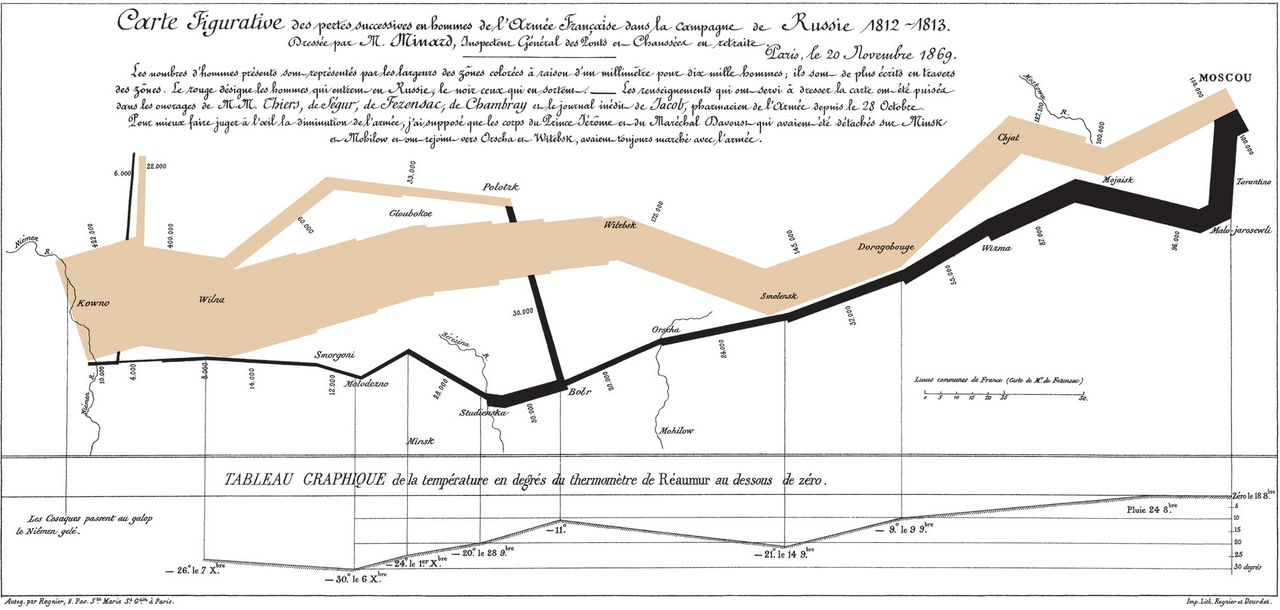
The classic distortion is the truncated baseline: a bar chart whose vertical axis starts at 92 rather than 0, so a two-point difference looks like a landslide. For bar charts the rule is not controversial. Bars encode quantity as length, and a bar cut off at the bottom encodes a length that is not proportional to the value. Start bar charts at zero, always.
Line charts are the genuinely contested case. A line encodes position rather than length, and forcing body temperature, blood pressure, or a bond yield to start at zero would flatten every meaningful movement into a straight line. Many practitioners therefore accept a non-zero baseline on line charts provided the axis is clearly labeled. Others point to experimental work showing that readers systematically overestimate the size of changes on truncated axes even when the labels are perfectly visible. The defensible middle: use a non-zero baseline on a line chart only when zero is not a meaningful value for that measure, label the axis unmistakably, and never truncate to manufacture drama.
Range selection is the quieter cousin of the truncated axis. If your program started in July and you show only July through December, you have shown a level, not a change. Show enough history for the reader to judge whether the recent movement is unusual — and if a longer series undermines your story, that is information, not an inconvenience. Aspect ratio matters too: stretch a chart tall and every wiggle becomes a crisis; squash it flat and a real trend disappears. A common rule of thumb is to size the plot so the typical line segment sits near forty-five degrees, which makes rate-of-change differences easiest to see.
Denominators, rates, and the percentage-point trap
The most consequential errors in professional data writing are not chart-formatting errors. They are denominator errors. A unit that reports twenty falls is not worse than a unit that reports ten if it has three times the patient days. A clinic with more complaints may simply have more visits. Whenever you present a count, ask what it should be divided by, and if the answer is “nothing meaningful,” say so explicitly.
Then there is the confusion between absolute and relative change. If satisfaction moves from 40 percent to 50 percent, that is a rise of ten percentage points, or a 25 percent relative increase. Both statements are true; writing “satisfaction rose 25 percent” without the word “relative” invites the reader to think the score is now 65. The safest construction gives the endpoints and names both changes: “from 40 percent to 50 percent — a ten-point gain, or a 25 percent relative increase.”
Relative change is also where small numbers do their worst work. Going from one infection to three is a 200 percent increase, and reporting it that way is technically accurate and practically dishonest. With small counts, give the counts.
| Distortion | What the reader wrongly concludes | Honest fix |
|---|---|---|
| Bar chart axis starting above zero | A small gap looks enormous | Start bars at zero; if detail matters, add a second panel zoomed in and labeled as such |
| Two series on a dual axis | The two lines “track each other,” when the scales were chosen to make them | Two stacked panels sharing the horizontal axis, or index both series to 100 at the start |
| Counts with no denominator | The biggest department looks like the worst performer | Report a rate, and give the denominator in the table |
| Cherry-picked range | A normal fluctuation looks like a turnaround | Show the longest series you have; mark the intervention on the plot |
| Relative change on tiny counts | “Up 200 percent” sounds like a crisis | “Rose from one case to three” |
| Area or 3-D effects | Differences are read as far larger than they are | Flat bars on a common axis; no perspective, no shadow, no depth |
| Unlabeled error bars | Precision is over- or under-read | State what the bars are: standard deviation, standard error, or 95 percent interval |
Showing uncertainty and small numbers
Every measurement carries uncertainty, and readers deserve some signal of it. In technical reporting that usually means a confidence interval; in operational reporting it may just mean stating the sample size next to the percentage. “Ninety percent of respondents agreed” means something entirely different when ten people answered than when four hundred did, and the honest form carries the number: “90 percent (n = 10).”
If you use error bars, label what they represent. A bar showing one standard deviation, one standard error, and a 95 percent confidence interval will be three visibly different sizes on the same data, and a figure that does not say which one it used cannot be interpreted. This is one of the most common defects in real reports, and it is trivially avoidable with a five-word note in the caption.
Finally, be careful with the word significant. In everyday professional prose it means “large enough to matter.” In statistics it means a result unlikely to have arisen by chance under a specified assumption — which is not the same thing, since a trivial difference can be statistically significant in a huge sample and an important one can fail the test in a small sample. If you do not mean the statistical sense, write “substantial,” “marked,” or “meaningful” instead.
Most misleading charts are built by honest people in a hurry, so audit your own scales, denominators, ranges, and uncertainty before someone else does.
Section 5Putting Visuals Into Documents, Slides and Screens
Number it, call it out, caption it
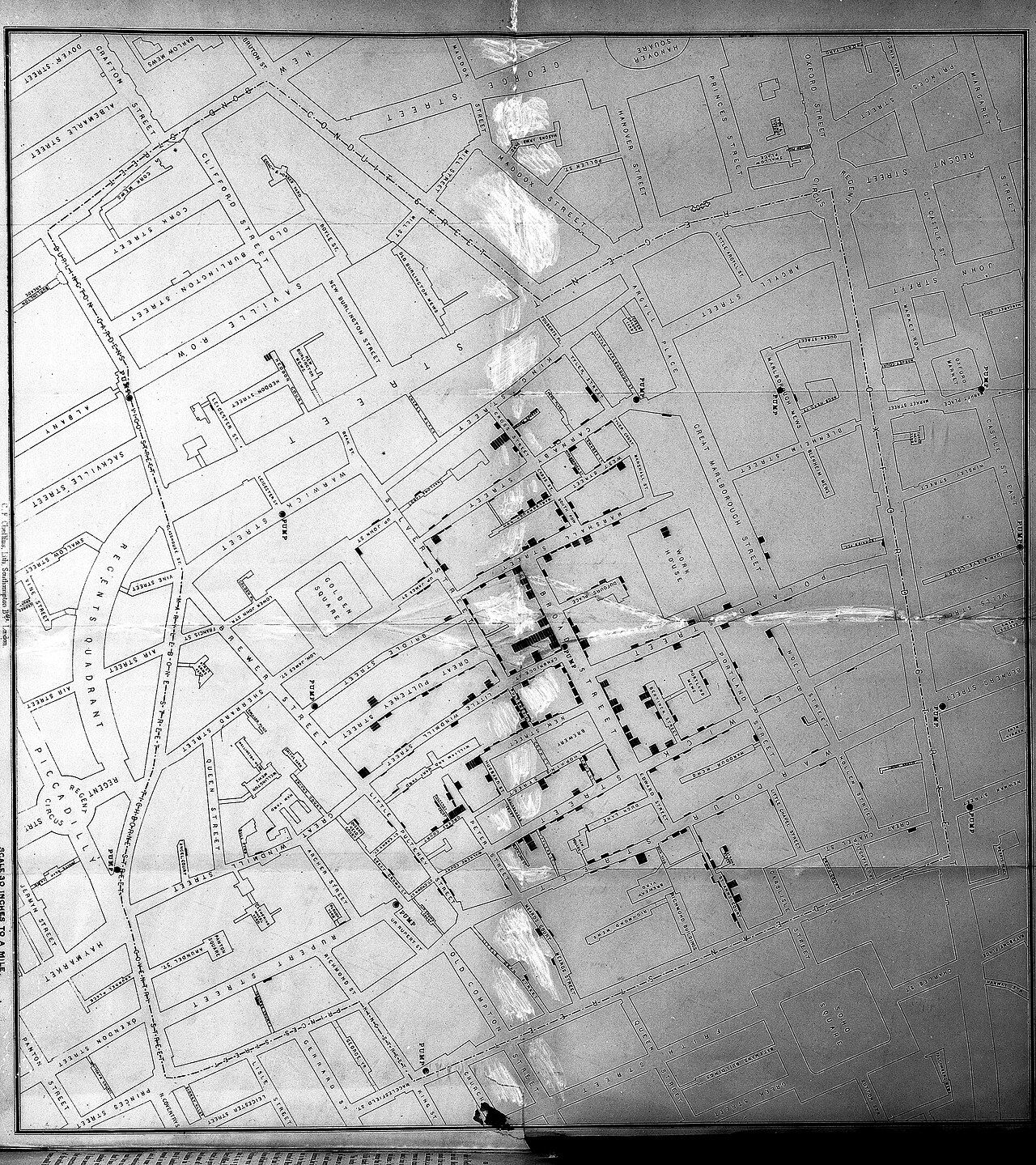
A visual dropped into a document with no introduction is an orphan. Three elements adopt it. First, a number and title (“Figure 2. Door-to-triage time, all shifts, 2025”). Second, a callout in the body text — the sentence that sends the reader to the figure at the right moment. Third, a caption that states the takeaway and the source.
The callout is the piece most often missed. Weak: “See the chart below.” This says nothing and breaks if the layout shifts the figure to the next page. Stronger: “Triage times cluster tightly on days and nights but scatter badly on the evening shift, with a tail past forty minutes (Figure 2).” The strong version states the finding, then cites the figure the way you would cite a source. Use “Figure 2” rather than “below,” because in a document that will be paginated, reflowed, or read on a phone, “below” is a promise you cannot keep.
Place the figure after its first mention, not before, and as close to it as the layout allows. If a figure and its discussion cannot fit on the same screen or page, repeat the key number in the prose so the reader is never asked to hold a value in memory across a page turn.
| Element | Weak version | Professional version |
|---|---|---|
| Callout | “The data is shown below.” | “Evening-shift triage times scatter far more widely than day or night (Figure 2).” |
| Figure title | “Chart1” | “Figure 2. Evening shift accounts for nearly all triage waits over 40 minutes” |
| Caption | “Triage data.” | “Each dot is one visit (n = 906). Source: EHR triage timestamps, extracted 14 Jan 2026.” |
| Alt text | “chart.png” | “Scatter plot of triage wait times by shift; evening values spread from 5 to 62 minutes while day and night stay under 25.” |
| Source line | (omitted) | “Source: internal incident reporting system; excludes off-unit transport events.” |
| Reused image | Pasted from a web search | “Adapted from Smith (2024), used under CC BY 4.0.” |
Accessibility is a writing task
Roughly eight percent of men and about half a percent of women have some form of color vision deficiency, most commonly difficulty distinguishing red from green. That is not a rare edge case; in a committee of twenty, it is likely someone in the room. The fix is not to avoid color but to avoid relying on color alone: differentiate lines by dash pattern as well as hue, label series directly, and choose a palette that stays distinguishable in grayscale. Print your chart in black and white; if it still reads, it will survive almost any screen.
Contrast matters as well. Accessibility guidelines commonly used in higher education and government — the Web Content Accessibility Guidelines — ask for a contrast ratio of at least 4.5 to 1 between normal text and its background, and at least 3 to 1 for large text and for meaningful graphical elements. Pale gray axis labels on white fail this routinely.
Then write real alt text. For a chart, alt text should convey the point, not the pixels: not “bar chart with four bars,” but “Bar chart: fall rate drops from 4.1 to 2.1 per 1,000 patient days across 2025.” When the underlying values genuinely matter, the most accessible thing you can do is also the simplest — include the data table in the document, and let the alt text point to it: “Full values in Table 1.”
Sources, permissions, and the version you say out loud
Every borrowed image needs an attribution line, and every borrowed image needs to be one you are allowed to borrow. A figure from a journal article is copyrighted; a figure released under a Creative Commons license is reusable on the license’s terms, which normally include naming the creator and the license. A screenshot of someone else’s dashboard is not a source. Chapter 10 treats permissions and legal risk in detail; the working habit for this chapter is simply that the source line goes on at the moment you paste the image, not later, because “later” is when attributions get lost.
Slides need a different build than reports. A report figure can carry a dense table because the reader controls the pace. A slide has one idea, a headline that states it, a chart with about six data points, and no legend. Anything the audience must squint at belongs in the handout. Move the detail into an appendix slide and tell people it is there.
Rehearse the spoken version, which is a distinct skill. A workable four-move talk track: orient, point, interpret, land. In practice: “This is the fall rate per 1,000 patient days for 4 East, by quarter, across last year. The dotted line in July is when hourly rounding started. Before it, we sat around four; after it, around two. Forty-two events is a small number, so I would not call this proven — but it is enough for me to recommend extending the pilot to 4 West.” About twenty-five seconds, and every element of the chart has been used. Notice that the speaker never read the axis labels aloud and never said “as you can see” — if they can see it, you do not have to say it.
A visual only becomes evidence when it is numbered, called out in a sentence, captioned with its source, readable without color, and short enough to be explained out loud in thirty seconds.
The chapter in one breath
Presenting data well is an act of interpretation before it is an act of design. Begin by writing the one-sentence finding you want repeated, then decide whether that sentence needs a table, a chart, or nothing at all — tables for lookup and exact comparison, charts for shape and proportion, prose for two or three values. Build tables the way readers actually scan them: cases in rows, variables in columns, meaningful row order, units stated once in the header, one rounding rule down the whole column, a real total, and a footnote that answers the obvious question. Choose chart types by naming the comparison — trend, ranking, part-to-whole, distribution, relationship — and encode the important quantity as position or length rather than area or hue. Then audit yourself: restore zero baselines on bars, supply denominators, resist the dual axis, show enough history, separate percentage points from relative change, and label your uncertainty. Finish by attaching the visual properly — numbered, called out by name, captioned with a source and an extraction date, legible in grayscale, described in real alt text, and rehearsed as a thirty-second spoken walkthrough. Data becomes evidence only when someone else can read it without you.
Words worth knowing
| Term | What it means |
|---|---|
| One-sentence finding | The single claim a display exists to prove, written before the display is built. |
| Denominator | What a raw count is divided by to become comparable — patient days, visits, employees, hours. |
| Rate | A count expressed per unit of exposure, such as falls per 1,000 patient days. |
| Significant figures | The number of digits a measurement actually justifies reporting; excess decimals imply false precision. |
| Stub column | The leftmost column of a table, holding the row labels that identify each case. |
| Assertive title | A figure or table title that states the finding rather than merely naming the variables. |
| Callout | The sentence in the body text that states a finding and cites the figure or table by number. |
| Encoding hierarchy | The rough ordering of how accurately people read visual properties — position, then length, then angle, area, and color. |
| Direct labeling | Placing each series name on or beside the data itself instead of in a separate legend. |
| Truncated baseline | A value axis that begins above zero, exaggerating differences — unacceptable for bars, contested for lines. |
| Dual axis | Two different vertical scales on one chart, which can manufacture the appearance of correlation. |
| Cherry-picked range | A time window chosen because it flatters the conclusion rather than because it is informative. |
| Percentage point | The arithmetic difference between two percentages; 40 percent to 50 percent is ten points, not ten percent. |
| Relative change | Change expressed as a proportion of the starting value; misleading when the starting count is tiny. |
| Confidence interval | A range of values consistent with the data under a stated model, used to signal uncertainty around an estimate. |
| Statistically significant | Unlikely to have arisen by chance under a specified assumption — not a synonym for “important.” |
| Alt text | A short text alternative that conveys a visual’s point to readers using screen readers or with images off. |
| Contrast ratio | A measure of legibility between foreground and background, commonly required at 4.5 to 1 for normal text. |
| Source line | The note beneath a table or figure naming where the data came from and when it was extracted. |
| Talk track | The rehearsed thirty-second spoken walkthrough of a visual: orient, point, interpret, land. |